Diagnosis
Pink or red dots in the same spot on every photo: what they are
If the same dots appear in the same place on every photo, the cause is on the sensor, not in the scene or the lens. It is one of three things: hot or stuck pixels, laser damage, or dust. Two test shots will tell you which.
Two test shots
- Lens cap on. Set a normal exposure such as 1/60s at ISO 800, cap the lens and take a photo. Dots that glow on the black frame are sensor pixels producing signal on their own: hot pixels or damage. Dust can't show up here, because dust only blocks light.
- Plain bright surface. Stop down to f/16, defocus, and photograph a white wall or clear sky. Soft grey blobs are dust. Small sharp coloured or white points are pixels.
Then zoom in to 200% and compare the positions with one of your real photos.
Which one is it?
| Hot or stuck pixels | Laser damage | Sensor dust | |
|---|---|---|---|
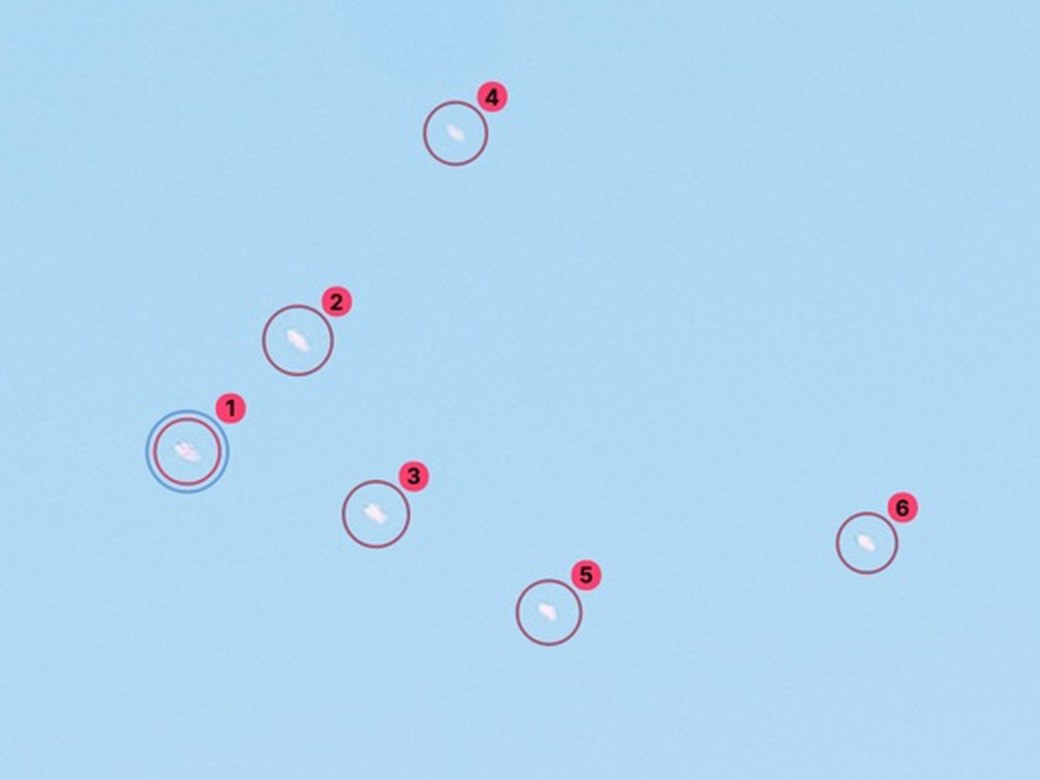
| Looks like | Single bright points, one pixel wide | Pink, red, purple or white dots a few pixels wide, often in a line or cluster | Soft dark grey blobs |
| Lens-cap shot | Visible | Visible | Not visible |
| Changes with aperture | No | No | Yes, sharper at f/16, gone at f/2 |
| Position | Fixed, scattered at random | Fixed, grouped where the beam crossed | Can move or disappear after cleaning |
| Worse with | Long exposures, heat, high ISO | Nothing, always there | Small apertures, plain backgrounds |
| Pixel mapping | Usually fixes it | Usually doesn't | No effect |
If it's hot or stuck pixels
Every sensor has a few and gains more with age. Run your camera's pixel mapping: on Sony it runs monthly on its own and you can force it by setting the date a month ahead, Olympus and OM System have it in the menu, recent Nikon Z bodies have it in firmware, and on Canon, owners report that a manual sensor clean left running for about a minute triggers it. Raw converters also hide most isolated hot pixels without telling you, which is why they can show in a JPEG or in video and not in a developed raw.
If they only appear in long exposures, turn on long exposure noise reduction, which subtracts a dark frame.
If it's laser damage
The giveaways are colour, grouping and history: pink or red dots a few pixels across, lined up or clustered, that weren't there before a concert, club, festival or a shoot near a laser. Pixel mapping usually leaves them untouched. Some owners only notice months later, in a shot with a plain sky.
The sensor won't heal and the dots won't spread. You can keep shooting and remove the dots from your photos, or replace the sensor. Our guide to fixing laser sensor damage compares six ways to do that, with costs.
If it's dust
Use a blower with the sensor facing down. If the spots stay, do a wet clean with swabs made for your sensor size, or have a shop do it. For photos you've already taken, any editor's spot removal handles dust well; Lightroom's Visualize Spots view makes the blobs easy to find.
If the dots move between photos
Then it isn't the sensor. Dots that change position are usually reflections and flare from bright lights, or high-ISO noise. Dots that follow one lens point to dirt or damage inside that lens.
Common questions
Why are there red dots in the same place on all my photos?
Dots that stay in the same position on every photo come from the camera sensor. They are hot or stuck pixels, laser damage, or less often dust. A lens-cap test shot separates pixels from dust.
How do I tell laser damage from hot pixels?
Hot pixels are single scattered points and usually disappear after pixel mapping. Laser damage is typically pink, red or purple dots a few pixels wide, grouped in a line or cluster, and pixel mapping doesn't remove it.
How do I tell sensor dust from dead pixels?
Take a photo with the lens cap on. Dust never shows on a black frame because it only blocks light. Dust also looks like soft grey blobs that sharpen at small apertures such as f/16.
Why do the dots show in JPEGs or video but not in my raw files?
Raw converters automatically hide isolated hot pixels when they develop the file. In-camera JPEGs and video don't always get the same treatment.
Can I keep using a camera with laser damage?
Yes. The damage doesn't spread and the rest of the sensor works normally. You either remove the dots from your photos in software or have the sensor replaced.